
Zoom & Lock Tabs by Domain
The software is designed to enhance web browsing efficiency by allowing users to zoom in on individual tabs or all tabs simultaneously, with the added functionality of locking the zoom level. This feature is particularly useful for users who work with detailed content such as design mockups, data visualization, or complex web applications. The ability to zoom by domain adds a layer of customization, enabling users to maintain consistent zoom settings across specific websites—ideal for frequent visitors to content-heavy platforms. The tool targets professionals and power users who rely on precise control over their browsing environment to improve productivity and reduce eye strain. Real-world scenarios include digital designers reviewing high-resolution layouts, researchers analyzing data dashboards, and remote workers managing multiple web-based tools. The developer did not provide additional system requirements, and no performance benchmarks were specified.
Key Features & Capabilities
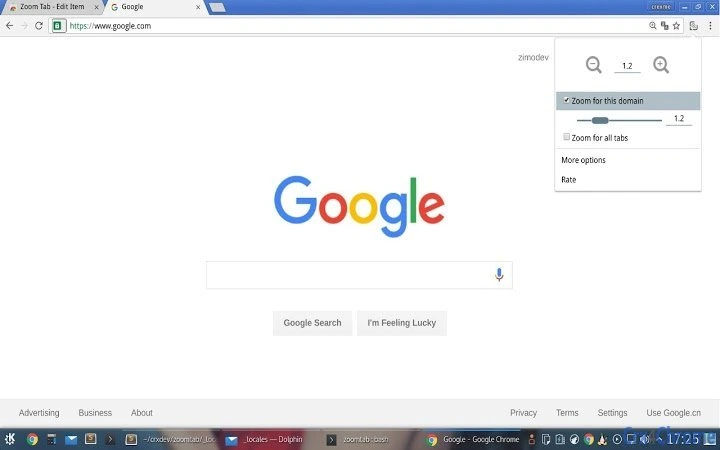
- Zoom Individual or All Tabs – Users can adjust the zoom level of a single tab or apply the same zoom setting across all open tabs at once. This is beneficial when comparing content across multiple pages or focusing on one detailed interface.
- Lock Zoom Level – Once a zoom setting is applied, users can lock it to prevent accidental changes during navigation or multitasking. This ensures consistency when working on time-sensitive tasks.
- Domain-Based Zoom Settings – The software remembers zoom preferences per website domain, so users don’t need to reconfigure settings every time they revisit a site. This is ideal for platforms with fixed layouts or high-density information.
- Seamless Browser Integration – Designed to work directly within supported web browsers, the tool operates without disrupting the standard browsing experience or requiring complex setup.
- Quick Access Controls – Zoom adjustments and locking functions are accessible via intuitive interface elements, minimizing the need for manual configuration during active work sessions.
User Interface, Workflow & Performance
The user interface is minimal and focused on functionality, with controls likely positioned within the browser’s extension toolbar or context menu. Navigation is straightforward, allowing users to select a tab, adjust zoom, and lock the setting with minimal clicks. The workflow is optimized for speed, making it suitable for users who frequently switch between tasks or need rapid access to specific zoom levels. The developer did not specify resource usage details, so general performance behavior is based on typical extension patterns. No stability issues were reported in the provided information, and the software appears to operate without requiring significant CPU or RAM overhead. Users can expect consistent performance across sessions, though exact behavior may vary depending on the browser and system configuration.
Compatibility & System Requirements
Supported operating systems include Windows and Mac, ensuring broad accessibility for desktop users. The software is designed as a browser extension, which means it integrates directly with major web browsers. The exact version compatibility was not listed, nor were specific hardware requirements. Installation size information is not available. Platform compatibility information is limited, and users are advised to verify functionality with their current browser setup. The developer did not provide additional system requirements.
Pros and Cons
Pros
- Efficient zoom control for individual or multiple tabs
- Ability to lock zoom levels for consistent viewing
- Domain-specific zoom settings for personalized browsing
- Designed for productivity-focused workflows
- Free to use with no cost barrier
Cons
- No information on system requirements or resource usage
- Compatibility details limited to OS support
- Limited visibility into update frequency or development activity
- No official documentation or user guides provided
- Dependent on browser extension ecosystem
Is this software compatible with my browser?
The software is designed for use on Windows and Mac systems, but specific browser compatibility was not listed. Users should check their browser’s extension store for availability.
Is the software safe to install?
As a browser extension, the software operates within the browser’s security model. No additional permissions beyond standard extension access were specified.
How often are updates released?
The update schedule was not provided. Users are advised to monitor the extension’s official listing for release notes.
Can I use this tool offline?
Yes, the software functions entirely within the browser and does not require an internet connection after installation.
What type of license does it use?
The software is available for free, indicating a permissive or open-use license, though the specific terms were not disclosed.
Final Thoughts + CTA
Zoom & Lock Tabs by Domain delivers a focused, practical solution for users seeking greater control over their web browsing experience. Its ability to zoom and lock tabs—especially by domain—makes it a valuable asset for professionals managing complex workflows. While details on performance, updates, and system requirements are limited, the core functionality is clear and well-suited to productivity-driven users. The free pricing model removes any barrier to entry, making it accessible to a wide audience. For anyone who spends significant time navigating detailed web content, this tool offers a simple yet effective way to improve focus and comfort. Download Zoom & Lock Tabs by Domain now.







